Try a RAM boot
On this page
This guide is a dry run, not the normal way to use this firmware. It loads the nfjrom
image into RAM through the Realtek bootloader so that you can see the port start on your
unit without writing anything to flash.
It requires a UART adapter and an opened enclosure. If you only want to use the firmware, go to the flash installation guide instead: that path needs no UART and no disassembly.
On the reference HH71VM this procedure did not write the Realtek SPI flash. The image runs until power is removed. Do not substitute another image or bootloader command.
Before you begin
You need:
| Item | Requirement |
|---|---|
| USB-to-UART adapter | 3.3 V logic levels; never use 5 V |
| UART wiring | RX, TX, and GND only; do not connect adapter power |
| Ethernet cable | Router LAN port directly to the test computer |
| Python | Python 3; the tool was tested with Python 3.9 |
| Python package | pyserial, installed from tools/requirements.txt |
| Image | firmware/openwrt-rtkmipsel-rtl8197f-hh71vm-nfjrom.bin from the flash bundle |
You must open the enclosure. Use the labelled photo below for the Realtek-side UART connection. Visually confirm the board orientation before connecting anything.
Show the Realtek UART pinout photo
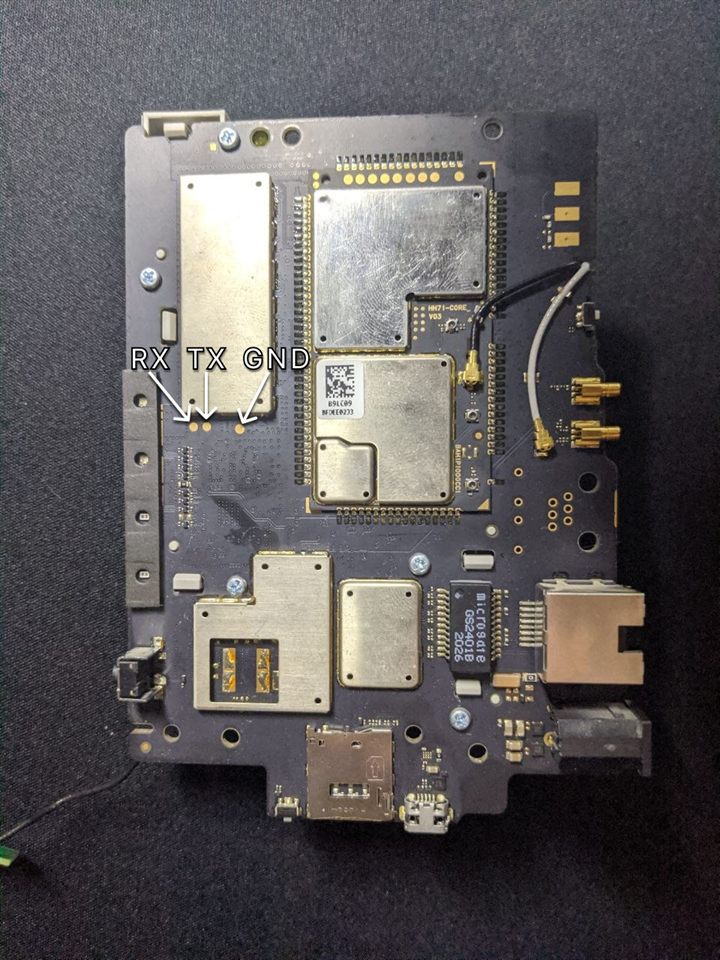
The loader does not use the stock web interface, Telnet, SSH, or any stock root password.
It talks only to the Realtek bootloader over UART and transfers the RAM image over TFTP.
1. Download and verify the bundle
Download the latest
flash bundle
and its SHA-256 file.
Verify the ZIP before extracting it, using the commands in the
flash installation guide. Then open a terminal in the extracted
hh71vm-openwrt-flash-bundle directory and run:
python verify_bundle.pyStop if verification fails. The command prints the exact immutable Release tag.
You can also inspect the RAM image directly.
Windows PowerShell:
Get-FileHash -Algorithm SHA256 firmware/openwrt-rtkmipsel-rtl8197f-hh71vm-nfjrom.binLinux or macOS:
grep ' firmware/openwrt-rtkmipsel-rtl8197f-hh71vm-nfjrom.bin$' SHA256SUMS | sha256sum -c -Stop if the checksum differs. Record the resolved Release tag and image SHA-256.
2. Install the Python dependency
Windows:
python -m pip install -r tools/requirements.txtLinux or macOS:
python3 -m pip install -r tools/requirements.txtNo external TFTP server is required; the RAM boot tool contains the required TFTP client.
3. Connect the UART
With the router powered off, connect:
- adapter TX to router RX;
- adapter RX to router TX;
- adapter GND to router GND.
Do not connect the adapter's VCC/5 V/3.3 V power pin. Power the router with its normal power supply.
Serial settings are 38400 baud, 8 data bits, no parity, 1 stop bit (38400 8N1).
Find the serial device name:
- Windows: Device Manager → Ports (COM & LPT), for example
COM8; - Linux: usually
/dev/ttyUSB0or/dev/ttyACM0; - macOS: usually
/dev/tty.usbserial-*.
On Linux, serial access may require membership in the dialout group. Log out and back in
after changing group membership.
4. Configure the computer's Ethernet interface
Connect the computer directly to the router's LAN port and set a static IPv4 address:
Address: 192.168.1.50
Mask:    255.255.255.0
Gateway: 192.168.1.1
DNS:     leave empty
The gateway does not interfere with the bootloader transfer and allows the computer to use the router for routed Internet access after OpenWrt starts. DNS may remain empty for the RAM transfer itself.
Disable or disconnect other interfaces using 192.168.1.0/24 to avoid routing the TFTP
traffic to the wrong adapter. During transfer, the bootloader uses 192.168.1.6; OpenWrt
uses 192.168.1.1 after boot.
5. Enter the Realtek bootloader
-
Open a serial terminal at
38400 8N1. -
Disconnect router power.
-
Hold the WPS button.
-
Apply power while continuing to hold WPS.
-
Release WPS when the console stops at the prompt:
<RealTek>
On the reference unit, the useful hold time was roughly 10–12 seconds, but use the prompt, not the stopwatch, as the success criterion. If a short line of unreadable characters is shown, press Enter once. If normal boot continues, power off and try again.
Do not enter any flash commands.
6. Start the RAM image
Close the serial terminal completely; only one program can own the port. From the repository
root, run the command below and replace COM8 with your actual port:
python tools/ram_boot.py firmware/openwrt-rtkmipsel-rtl8197f-hh71vm-nfjrom.bin --port COM8Linux or macOS example:
python3 tools/ram_boot.py firmware/openwrt-rtkmipsel-rtl8197f-hh71vm-nfjrom.bin --port /dev/ttyUSB0Do not rename the image. The verified bootloader path selects RAM execution from the
nfjrom substring in the transferred filename. The tool also sends AUTOBURN 0 and exposes
no flash-write command.
The complete serial session is saved automatically under tools/ram-boot-logs/. Keep this
file even when boot succeeds.
Expected milestones include:
Jump to 0x84000000
procd: - init -
Please press Enter to activate this console.
If your output differs, do not start guessing bootloader commands. Save the log and report the exact last line reached.
7. Connect to OpenWrt
Ethernet:
ping 192.168.1.1
ssh -o HostKeyAlgorithms=+ssh-rsa [email protected]
The image initially has no root password. Modern OpenSSH clients need the explicit legacy host-key option shown above.
LuCI:
http://192.168.1.1/Default Wi-Fi:
| Band | SSID | Password |
|---|---|---|
| 2.4 GHz | HH71VM | hh71vm12345 |
| 5 GHz | HH71VM-5G | hh71vm12345 |
Set a temporary root password in LuCI before connecting untrusted clients. OpenWrt-side changes disappear when this RAM image is power-cycled.
Return to the installed firmware
Disconnect power, wait a few seconds, then power on normally without holding WPS. On the reference unit, this returned to the firmware already stored in flash.
After a successful dry run
If the build started and the subsystems you care about worked, install it permanently with the flash installation guide. Nothing from this RAM session carries over: the installer starts from your stock firmware and takes its own backup.
Troubleshooting
No <RealTek> prompt
Confirm the Realtek UART, 3.3 V levels, RX/TX orientation, common ground, and 38400 8N1.
Try a slightly shorter or longer WPS hold.
Serial port is busy or access is denied
Close PuTTY and every other serial program. On Linux, verify permissions for the serial
device and membership in dialout.
ModuleNotFoundError: No module named 'serial'
Install the dependency through the same interpreter used to run the tool:
python -m pip install -r tools/requirements.txtUse python3 instead of python where required.
TFTP does not start
Verify 192.168.1.50/24, the direct LAN cable, and that no other adapter owns
192.168.1.0/24. Allow inbound UDP for the Python interpreter in the host firewall.
OpenWrt boots but networking does not work
This is a high-value compatibility result. Keep the complete UART log and submit a hardware compatibility report. Do not hide early boot warnings.
SSH reports a changed host key
RAM boots can generate a different SSH host key. Remove only this host's stale entry:
ssh-keygen -R 192.168.1.1Do not delete the entire known_hosts file.
LuCI shows Bad Request or another unexpected page
The browser may still have the vendor web interface cached for 192.168.1.1. Reload the
page with F5. If the problem remains, use a hard reload, clear the browser cache/site data
for 192.168.1.1, or open http://192.168.1.1/ in a private window.
201b0e1